Still running Windows Server 2016? Learn why Perth medical clinics and businesses should start planning server upgrades, cyber security improvements, backups, and infrastructure modernisation before support ends.
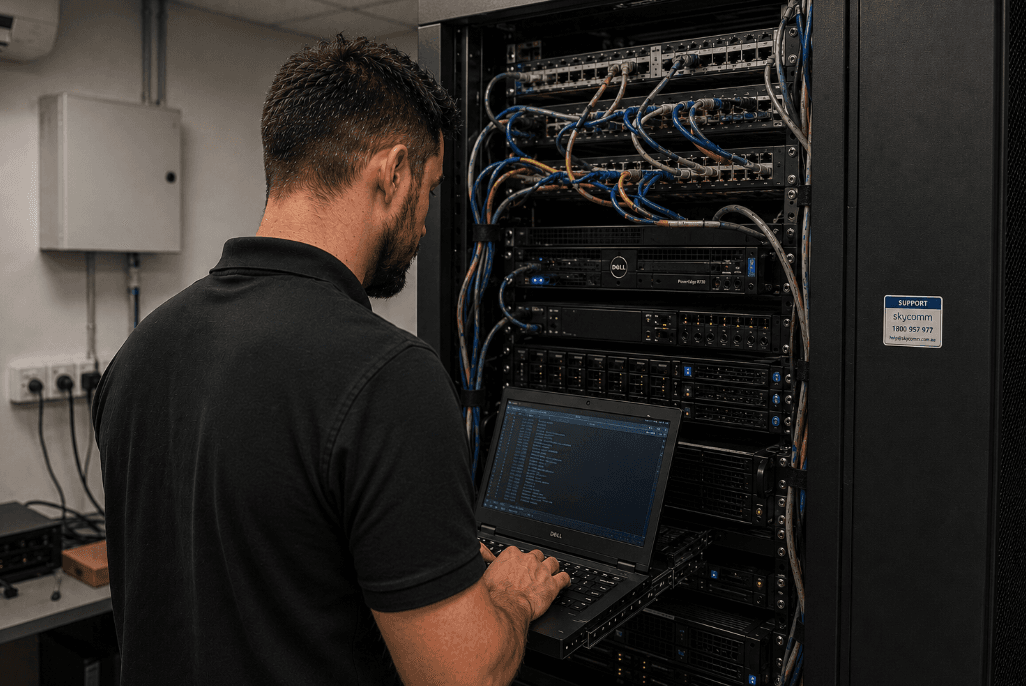
Windows Server 2016 reaches end of support on 12 January 2027. That does not mean servers will suddenly stop running the next day, but it does mean Perth medical clinics and businesses should start planning now — especially where clinical software, remote access, backups, or third-party integrations are involved.
For healthcare environments, this is a common situation. Many clinics stayed on Windows Server 2016 because the environment was stable, the hardware still worked, and clinical systems such as Genie Solutions, imaging workflows, scanning tools, pathology links, and other integrations needed time to support newer platforms properly.
That was a practical decision at the time. The risk now is leaving the next move too late.
SkyComm supports medical IT environments across Perth, including server upgrades, Genie infrastructure, remote desktop environments, Microsoft 365, backups, and cyber security planning for clinics that cannot afford messy downtime.
Why so many businesses are still running Windows Server 2016
Across Perth, many businesses and medical clinics still operate Windows Server 2016 because the server has kept doing its job.
Common reasons include:
- the server environment has remained stable
- clinical or legacy software needed older operating system support
- existing server hardware is still functioning reliably
- the upgrade was postponed to avoid operational disruption
- some third-party vendors and integrations were slower to support newer server platforms
- Genie Solutions or other clinical software
- Remote Desktop services
- pathology and radiology integrations
- scanning and imaging systems
- shared files and document storage
- backup jobs and business continuity tools
- legacy applications that are still part of the daily workflow
What happens when Windows Server 2016 support ends?
When Microsoft ends support for an operating system, the server does not switch off. Staff may still be able to log in, files may still open, and applications may continue to run.
The issue is what happens after that.
Once regular support ends, organisations can face:
- no ongoing security updates
- higher cyber security exposure
- increased ransomware and malware risk
- reduced compatibility with newer software
- more pressure from cyber insurance requirements
- harder support from software and hardware vendors
- higher long-term reliability risk
For medical practices, the stakes are higher because patient information, appointment systems, billing, clinical software, and referral workflows all rely on stable access to technology.
Why Perth medical clinics should pay closer attention
Healthcare businesses are attractive targets for cyber attacks because they store sensitive patient information and rely heavily on uninterrupted system access. A clinic cannot simply pause operations for a few days while a server is rebuilt from scratch.
Older server environments may be missing or struggling to support:
- modern endpoint protection
- stronger authentication standards
- current encryption and security protocols
- advanced threat detection
- secure remote access controls
- modern backup and disaster recovery methods
- clean integration with Microsoft 365 and cloud services
Common signs your server environment needs a review
A server can be technically “working” while still creating avoidable risk. These are the signs worth paying attention to.
Slow performance
Watch for delays opening files, slow Remote Desktop sessions, long staff login times, or clinical software that feels heavier than it used to.
Storage pressure
This is especially common in clinics with large scanned document libraries, imaging exports, reports, and years of archived patient files.
Increasing IT issues
Unexpected crashes, failed updates, unreliable remote access, or regular server warnings are signs that the environment needs closer review.
Unsupported hardware
Older servers may be outside warranty, and replacement parts may not be easy to source quickly. That matters when the server is supporting daily operations.
Backup concerns
Legacy backup systems may no longer meet modern recovery expectations. A backup is only useful if it is monitored, protected from ransomware, and tested for restore.
Server upgrade vs cloud migration: what is best?
There is no one-size-fits-all answer. The right pathway depends on the software, data, users, internet reliability, budget, and downtime tolerance.
For some businesses, a new on-premise server is still the most practical option. For others, a hybrid cloud setup or staged migration will make more sense.
Typical options include:
New on-premise server
Suitable for organisations that still need local infrastructure, local application performance, or direct support for existing clinical and business systems.
Hybrid cloud environment
A hybrid approach can combine local infrastructure with services such as Microsoft 365, cloud backup, identity management, or selected workloads in Microsoft Azure.
Virtualised infrastructure
Modern virtual environments can improve flexibility, redundancy, backup capability, and disaster recovery options compared with a single traditional server.
Gradual migration strategy
Some businesses are better served by staged upgrades. This can reduce disruption, spread costs, and allow vendors to test compatibility before the final cutover.
The wrong move is choosing a platform first and forcing the business to fit around it. The better approach is to review the workload, software dependencies, risk profile, and recovery requirements before deciding.
Upgrading does not have to mean major downtime
Downtime is usually the biggest concern for clinics and businesses. Fair enough — if reception cannot access bookings, doctors cannot access clinical software, or staff cannot open files, the impact is immediate.
With proper planning, many server upgrades can be completed with minimal disruption using:
- after-hours migrations
- parallel server environments
- backup validation before the cutover
- clinical software vendor coordination
- pre-deployment testing
- planned cutover scheduling
- rollback planning in case something unexpected appears
How SkyComm helps Perth clinics and businesses plan the move
At SkyComm, we help Perth businesses and medical clinics modernise older server infrastructure while minimising operational disruption.
We regularly assist with:
- Windows Server upgrades
- medical clinic server environments
- Genie Solutions infrastructure
- Remote Desktop environments
- Microsoft 365 integration
- cyber security improvements
- backup and disaster recovery
- cloud and hybrid cloud solutions
- business continuity planning
- ongoing managed IT services
Final thoughts
If your business or medical clinic is still running Windows Server 2016, you are not alone. For many organisations, staying on Server 2016 was a practical decision based on stability, vendor support, and operational continuity.
But with support ending on 12 January 2027, now is the right time to review your options before the decision becomes urgent.
A properly planned upgrade can improve:
- security
- reliability
- performance
- backup capability
- remote access
- long-term business continuity
Frequently asked questions
Is Windows Server 2016 still supported?
Windows Server 2016 reaches end of support on 12 January 2027. Businesses should start planning upgrade pathways before that date, especially where the server supports clinical software, backups, remote access, or sensitive business data.
Why are many medical clinics still using Windows Server 2016?
Many clinics stayed on Windows Server 2016 because their clinical systems, integrations, scanning workflows, imaging storage, pathology links, or Remote Desktop environments were stable and working. In some cases, practices also waited for software vendors and third-party integrations to support newer server platforms.
Does an old server increase cyber security risk?
Potentially, yes. Older or unsupported servers may miss modern security updates, authentication standards, ransomware protection, and recovery controls, increasing exposure over time.
Can we upgrade our server without major downtime?
In many cases, yes. With planning, testing, backup validation, vendor coordination, and after-hours migration windows, server upgrades can often be completed with minimal disruption.
Should we move to the cloud instead of replacing our server?
It depends on the business and software requirements. Some organisations benefit from cloud or hybrid environments, while others still need local infrastructure for performance, compatibility, or operational reasons.
How do I know if my server hardware is too old?
Common indicators include slow performance, storage limits, expired hardware warranties, failed updates, backup concerns, increasing support issues, or an unsupported operating system. A server health review can help determine whether an upgrade should be planned.
Need advice on your existing server environment?
SkyComm provides server lifecycle reviews for Perth businesses and medical clinics to help identify ageing hardware risks, unsupported systems, backup concerns, cyber security improvements, and practical upgrade recommendations.
Contact SkyComm or call 1800 957 977 to discuss your current server environment before support deadlines create unnecessary pressure.
SkyComm IT Solutions
Perth's leading medical and business IT support provider. Trusted by healthcare practices, law firms, and businesses across Western Australia for over 20 years.